Aligned with your IT policies
Identity, access, network restrictions and security settings are reviewed with the customer's IT team during deployment.
From access permissions to code scanning and independent testing, our security approach is designed to work with the requirements of enterprise IT teams.
Automail is configured for each deployment. We document controls, review findings, and invite your security team to validate the setup.
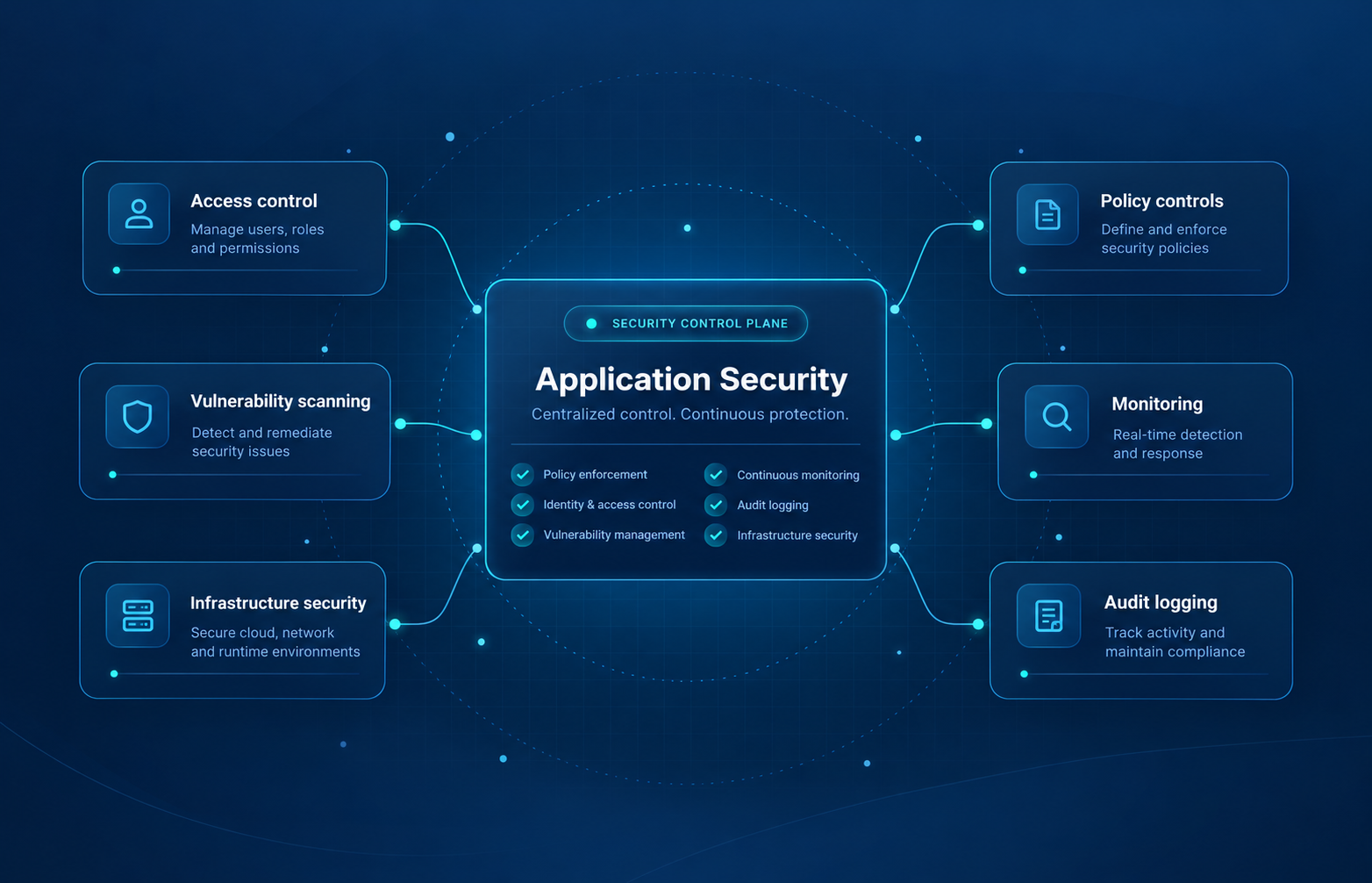
Every customer has different IT policies. We combine platform safeguards with deployment-specific configuration, evidence-based reviews, and clear ownership of security findings.
Identity, access, network restrictions and security settings are reviewed with the customer's IT team during deployment.
We address application behavior, underlying infrastructure, software dependencies, and the engineering devices used to maintain them.
We support customer-run security assessments and use external scanning alongside internal code and configuration checks.
These controls and practices cover the common areas of a third-party security questionnaire. Some are part of the Automail platform; others are applied or tuned for the individual customer environment.
Who can sign in, and what can they do?
Protecting the workflows users interact with.
Knowing what happens and what to do next.
Security checks beyond the application login.
Checking controls from an attacker's perspective.
Hosting choices without losing security oversight.
Configuration matters. The exact settings, hosting boundaries, test scope and control owners should be confirmed for each Automail instance. A capability listed here is not a claim that every optional setting is enabled in every deployment.
We use both automated tooling and targeted application testing. Findings are assessed for severity and addressed through the engineering process, rather than treated as a one-time pass/fail exercise.
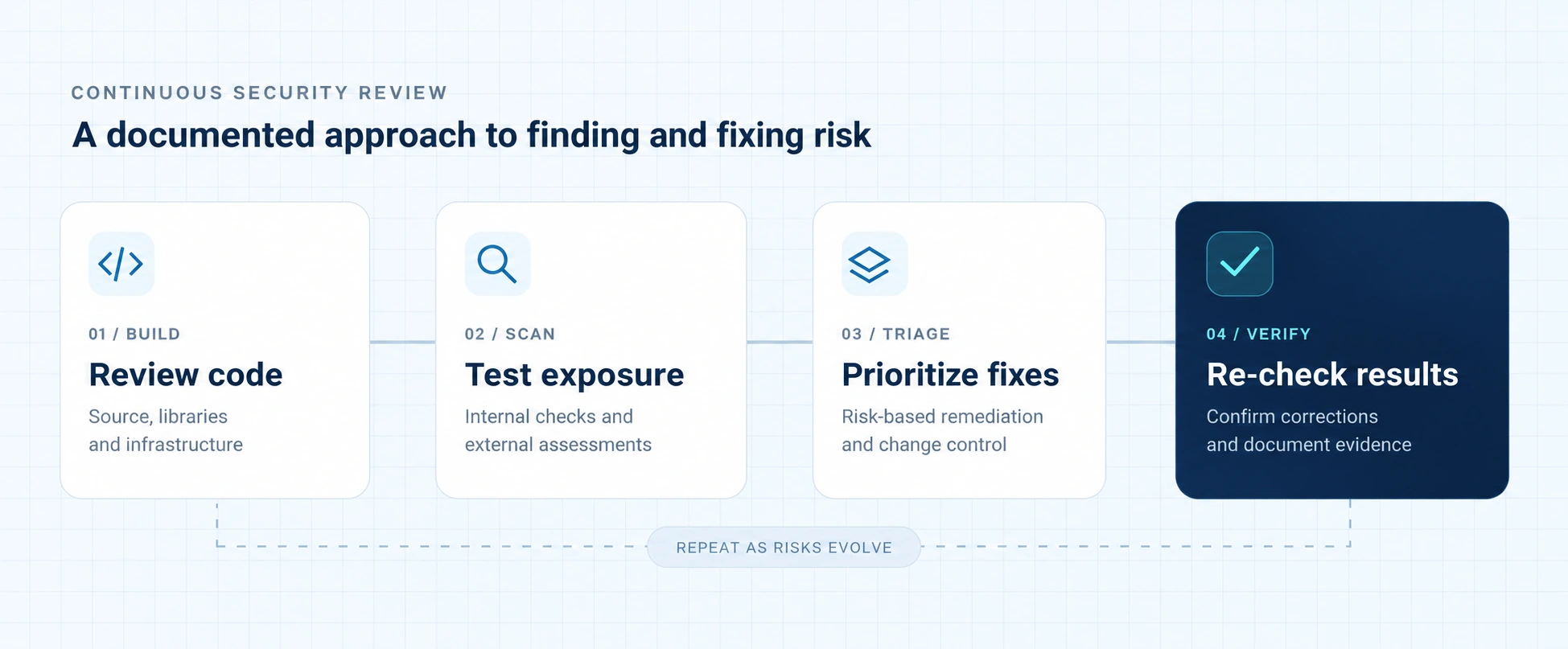
Static analysis covers application source, third-party packages (including transitive dependencies), and Terraform infrastructure configuration. A documented review was conducted in March 2026.
GitHub Security monitors known package risks and can create automated security notifications and dependency update pull requests for engineering review.
We have used Intruder to assess an internet-facing Automail test environment. The March 2026 scan produced findings for review and remediation; it is not a certification or penetration-test sign-off.
We encourage customer security departments to conduct their own coordinated vulnerability scans and penetration tests, including authenticated and unauthenticated application scenarios. We review findings with your team and prioritize necessary changes.
Automail is hosted by default in Lineverge-managed AWS, with a separate environment for each customer. Organizations can also choose a customer-managed cloud or an on-premises deployment, in coordination with their IT department.
For our AWS infrastructure, we use Terraform Infrastructure as Code (IaC) to define and manage cloud resources and security configuration. This replaces ad-hoc setup with a repeatable, version-controlled baseline that IT teams can review and scan. Customer-managed environments are adapted to the selected cloud provider and its security requirements.
Customer IT teams can arrange an authorized review of the relevant Terraform source and run infrastructure-as-code security scans. We also use Snyk to check Terraform configurations for potential security issues. Code access, scope and findings are coordinated with your team.
Infrastructure, networking, access controls and supporting cloud services in code.
Examine configuration changes, run IaC checks and align with IT policy.
Apply the agreed configuration to the selected cloud environment.
Manage infrastructure updates through reviewable configuration changes.
Dedicated customer environments managed by Lineverge, with cloud infrastructure provisioned through Terraform.
Deploy within the customer's cloud environment using the applicable provider configuration, permissions and security requirements.
Run Automail on company-controlled infrastructure where required, with network access, operations and responsibilities agreed with IT.
Provider-specific Terraform configurations and the split of security responsibilities depend on the deployment. On-premises infrastructure follows the customer's own provisioning and security processes.
Every Automail instance is maintained as a fork of our core repository. Shared updates can be brought in from upstream, while customer-specific configuration stays isolated. Releases then follow a controlled, repeatable path from development to production.
One maintained codebase for shared application modules, improvements, and security updates.
Main product repositoryShared core + project/ settings & workflows
Shared core + project/ settings & workflows
Shared core + project/ settings & workflows
Each customer fork uses separate Git branches and environments. Authorized senior Lineverge team members control pushes to the release branches; each UAT or production push automatically triggers its respective deployment pipeline.
masterEngineers develop and verify application changes and customer-specific settings using local testing.
uatA separate, smaller-scale instance with project settings and test data lets business users validate changes before go-live.
prodAfter UAT validation, changes reach the production instance through the automated release pipeline.
Security requirements are discussed with customer IT before go-live, whether Automail is hosted by Lineverge or deployed in a customer-managed environment.
Lineverge does not currently hold SOC 2 or ISO 27001 certification. We provide information about actual practices, scoped reviews and relevant evidence instead of presenting a certification badge.
Corporate OIDC SSO or controlled local authentication, with password and session requirements defined for the deployment.
Agree user responsibilities, administrative permissions, API access, and joiner/mover/leaver procedures.
Choose Lineverge-managed AWS, your own cloud or on-premises hosting. Review the applicable Terraform baseline, network boundaries, encryption, backups and operational responsibilities.
Align event logging, incident contacts, security-testing windows and follow-up evidence with your IT team's needs.
A practical starting point for vendor-security questionnaires. Your deployment-specific questions can be covered directly with our engineering team.
We can discuss the applicable configuration, testing history, incident procedures, and supporting documentation with qualified IT reviewers. Reports are shared appropriately, with the relevant scope and remediation context.