RFQ Automation
For companies sourcing hundreds or thousands of products, requesting and revising supplier quotations is a repetitive task. Automail automates much of that work without replacing existing PLM systems.
From product design to supplier quotations
RFQ stands for Request for Quotation. Suppliers quote for products with a breakdown of material, labor, and other manufacturing costs. Sourcing teams compare the offers, negotiate, and select a supplier.
This example covers Tier 1 suppliers manufacturing finished garments, such as shirts, trousers, jackets, underwear, and other apparel products.
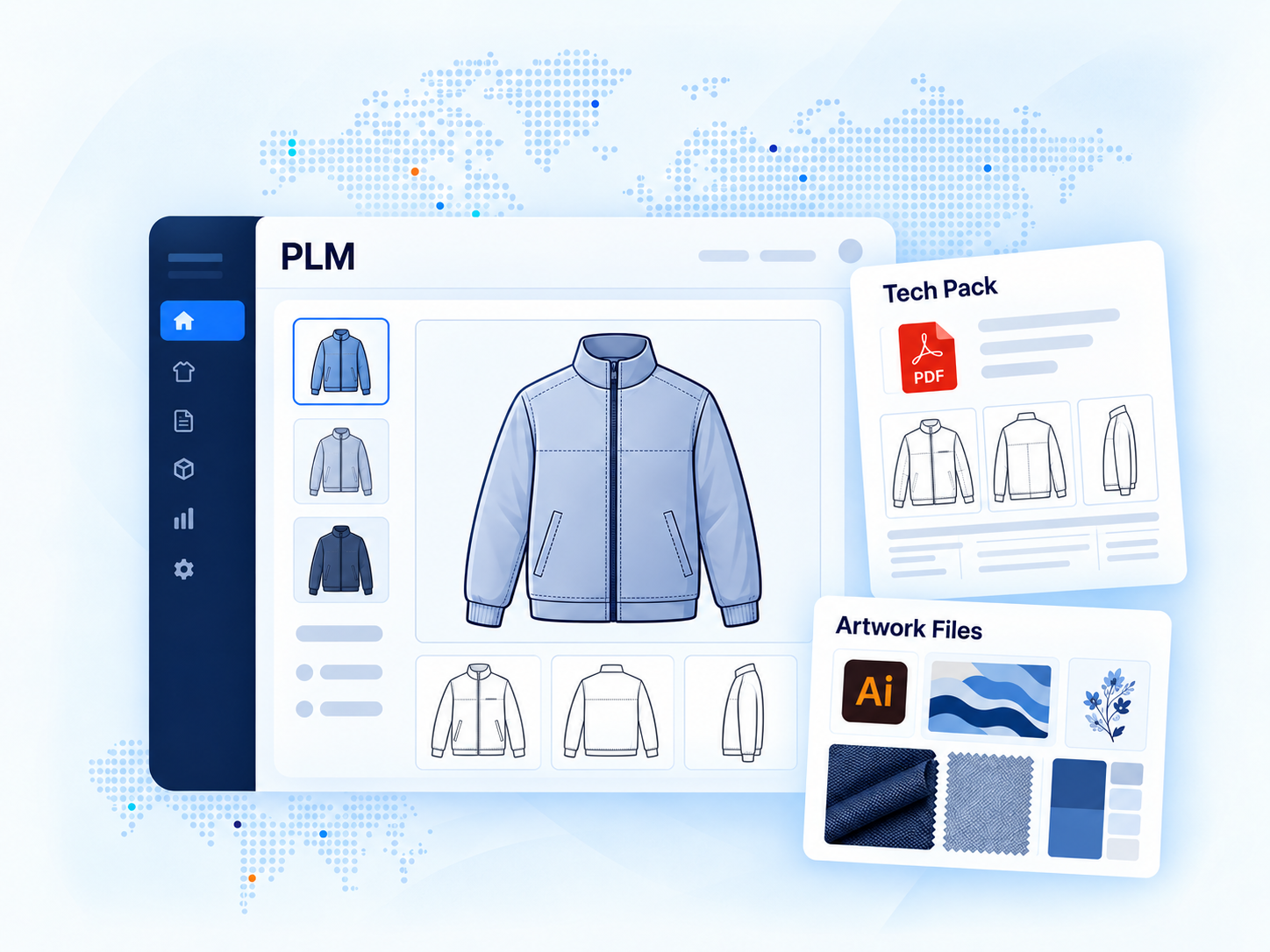
Design teams create product references in a Product Lifecycle Management (PLM) system, recording fabric, sizing, construction, and other specifications. The PLM generates PDF tech packs containing the complete product specifications and makes them available for users to download, alongside artwork files for prints and graphics in their respective formats.
Once a product reference is ready for quotation, merchandisers across sourcing offices invite multiple suppliers. The competing quotes support price comparisons, negotiations, and the final sourcing decision.
The real workload is keeping quotations up to date
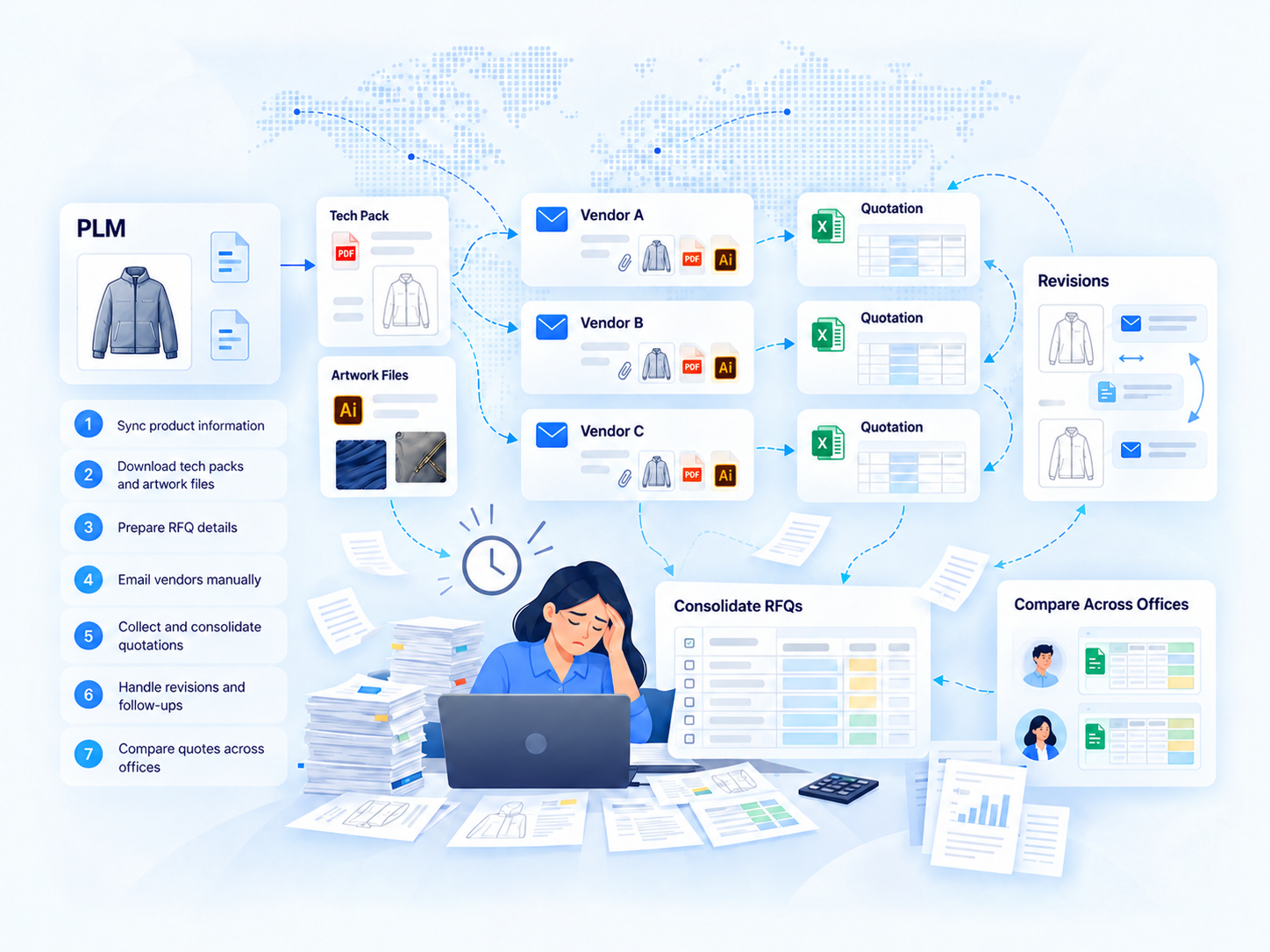
Without automation, merchandisers download tech packs and artwork from PLM, email them to suppliers, then collect Excel quotations and consolidate the responses.
Quotations are requested while designs are still evolving. Every change to materials, construction, or artwork can trigger another round of downloads, emails, revised quotes, and comparisons across sourcing offices.
In an exercise with sourcing managers, estimated merchandising time per product reference added up to thousands of hours per season across the team.
Why not use a large sourcing platform?
Enterprise sourcing suites such as SAP Ariba and Coupa can work well for broad procurement programs. But applying one to a specific RFQ workflow can turn a relatively simple need into a major project.
Costing structures, approvals, and team responsibilities differ across business functions. Adopting a full platform may require complex integrations, changes to working practices, and supplier onboarding.
Full platform approach
- Adapt sourcing processes to the platform's structure.
- Configure business rules and PLM integration.
- Introduce supplier accounts and onboarding.
- Plan for a broader budget and rollout.
Automail workflow layer
- Keep the existing PLM and sourcing rules.
- Automate repetitive RFQ and revision tasks.
- Collect quotes through email and Autoform.
- Deploy the workflow first, then refine it.
Automail complements existing enterprise systems rather than replacing them.
Automail takes over the work between PLM and suppliers
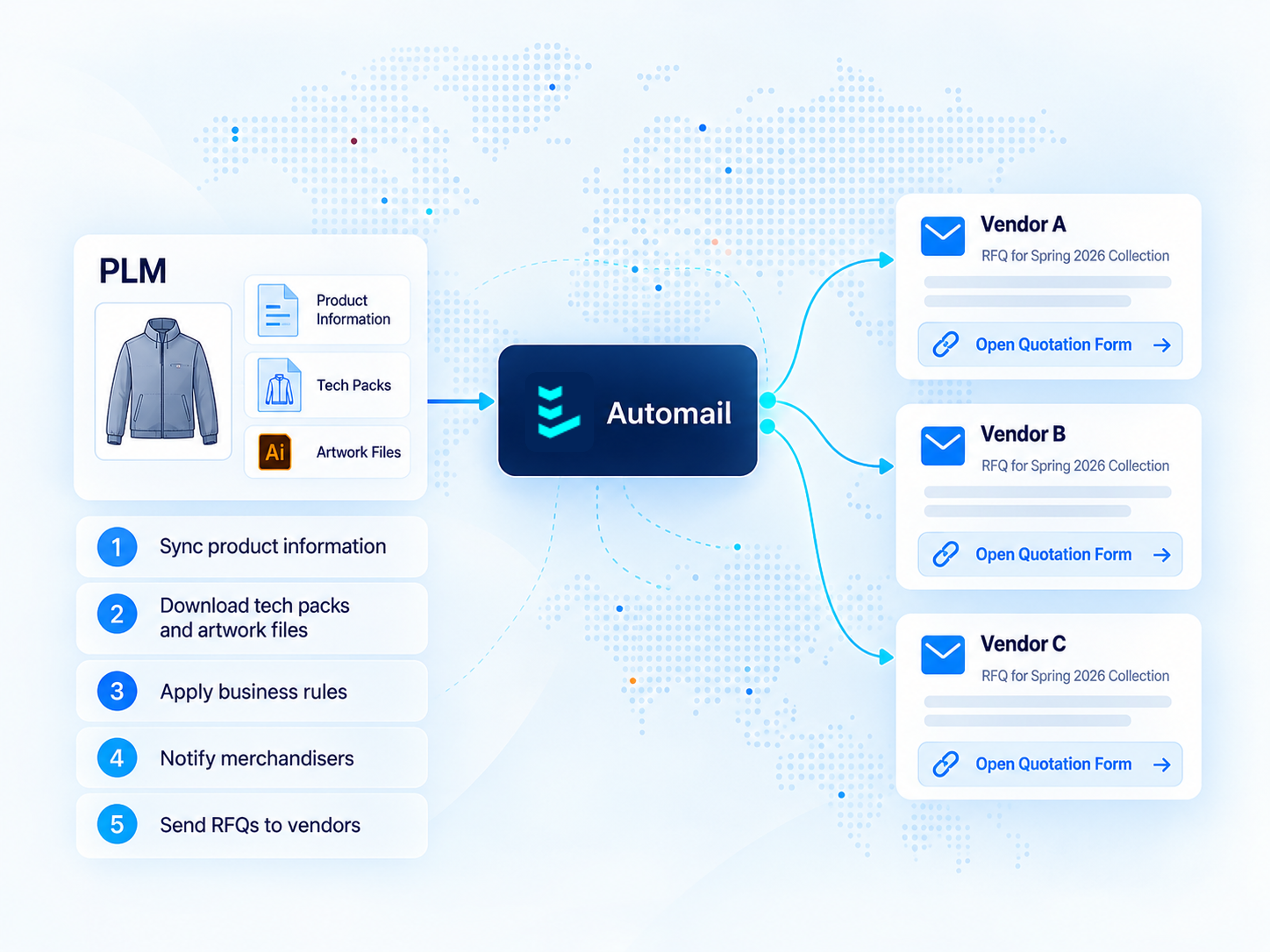
Automail uses an in-built or custom-developed PLM connector to retrieve product references, specifications, tech packs, and artwork. It continuously detects new references and changes.
Business rules assign each reference to the appropriate merchandising group, which selects the suppliers. Automail emails RFQ instructions in each supplier’s preferred language, together with a unique Autoform link.
Further PLM changes can trigger updated quotation rounds and reminders, while responses remain consolidated in Automail.
Product references, specs, and files.
Assign the sourcing group.
Merchandisers choose suppliers.
Email and unique Autoform link.
Quotations, updates, and reminders.
A quotation sheet suppliers can open directly
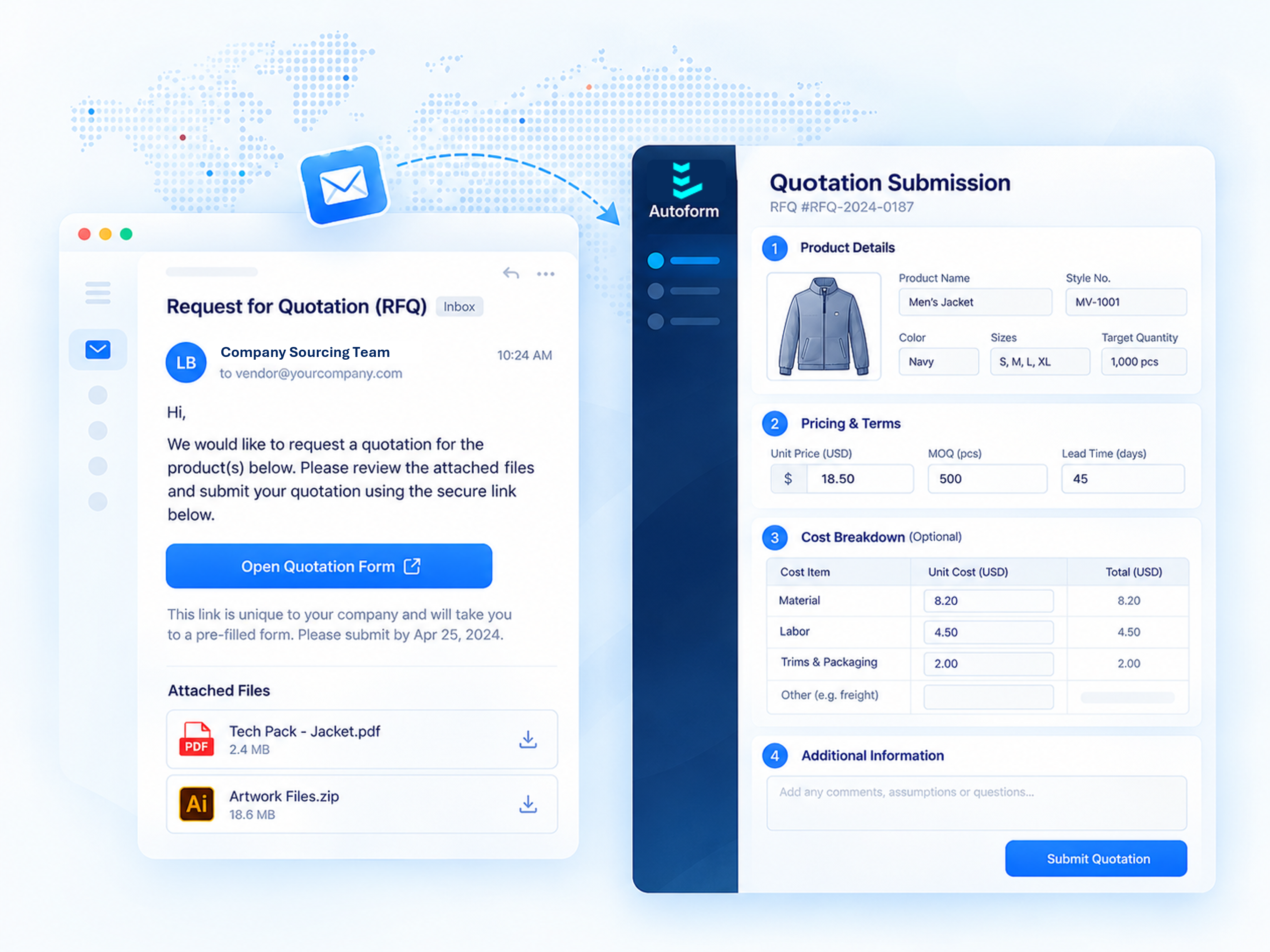
Autoform is our flexible external data-collection application. In this RFQ workflow, it serves as a supplier-facing quotation sheet, combining form controls with spreadsheet-style entry. Automail structures and prefills each sheet, then retrieves the submitted values.
Suppliers receive unique RFQ links by email and submit or revise quotations directly. No account or portal training is needed.
Autoform is a separate application for external parties. Suppliers neither need nor have access to Automail.
Merchandisers and authorized company users work in Automail to manage the process, review quotes, compare suppliers, and export data.
Built around the process, not the other way around
Automail and Autoform were designed to be easy for the Lineverge deployment team to configure. This lets us adapt to each function’s rules, refine workflows with users, and release adjustments quickly.
Broad sourcing-suite rollouts can take 18 months or more. A focused Automail RFQ workflow can be deployed in a few weeks, depending on integration access and scope.
1. Understand the existing workflow
Map quotation, revision, approval, and exception handling with users.
2. Connect the existing systems
Coordinate with IT, connect PLM, and configure business rules.
3. Run end-to-end tests
Test actual RFQ scenarios with key users.
4. Go live with suppliers
Release the stable workflow directly to suppliers.
5. Refine and monitor
Review feedback weekly; automated alerts flag unusual cases for proactive attention.
Weeks, not a long platform rollout
Deploy one focused workflow without replacing the existing enterprise systems.
Fixed fees, iterative adjustments
Agree on fees and timelines upfront. Refinements and change requests during deployment are included.
Timelines depend on scope, integration access, and internal readiness.
The collected data is not locked into Automail
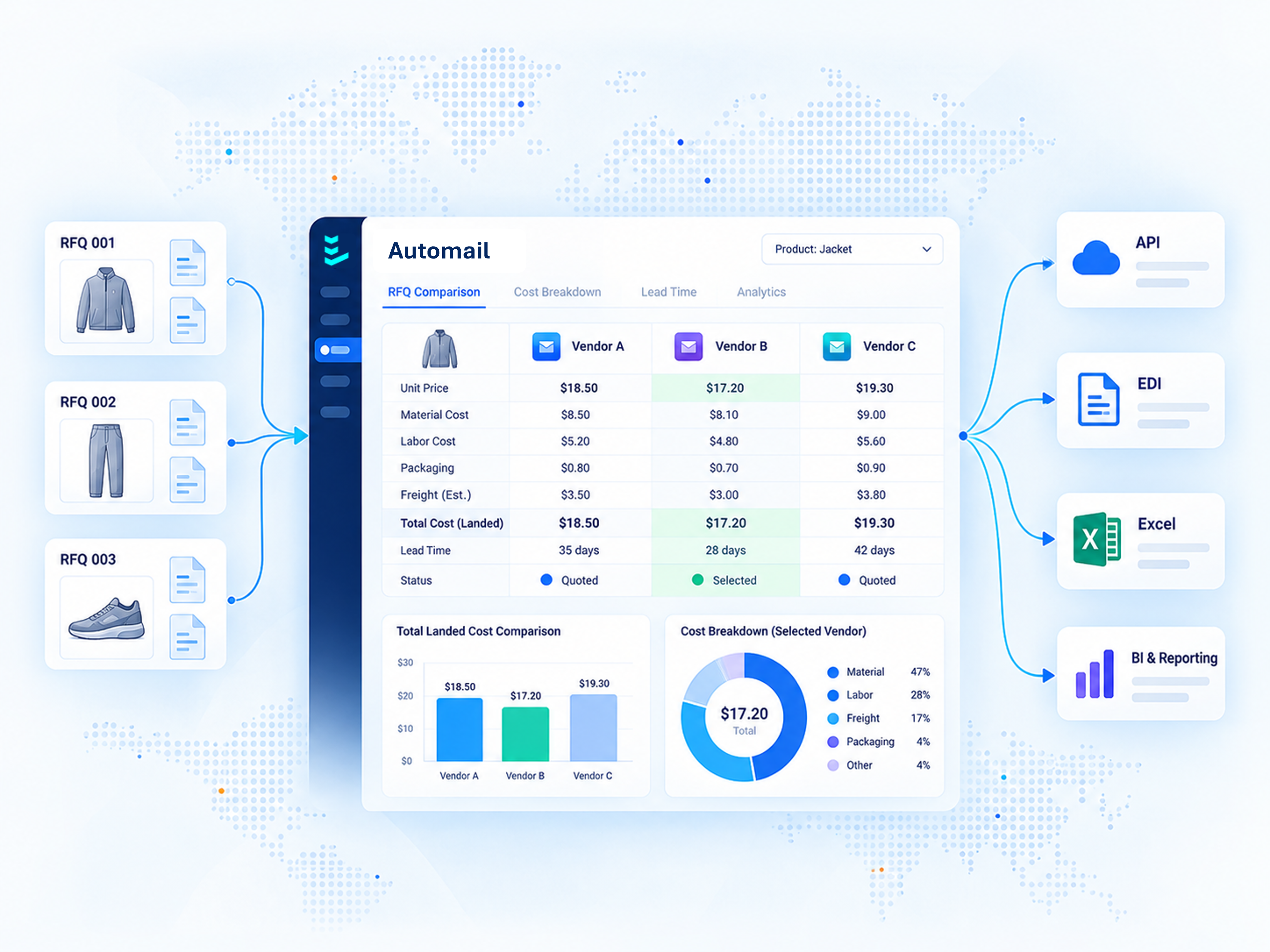
Sourcing teams compare consolidated quotations and cost breakdowns directly in Automail.
The same data can flow through API or EDI into existing ERP systems and the company’s preferred reporting and analytics tools.
A simpler way to manage a complex process
The result is a decentralized, email-based RFQ process with centralized oversight. Less manual work makes it practical to invite more suppliers, collect competing quotes, and negotiate with better information.
Less repetitive work
Reduce repeated downloads, emails, reminders, and Excel consolidation.
Easy for suppliers
Respond through a link, with no account or Automail access.
More sourcing options
Gather competing quotes from more suppliers with less work.
Clearer oversight
Track supplier participation, comparisons, and sourcing distribution.
The goal is not another platform for everyone to learn, but a faster, more scalable, and more transparent sourcing process that works with existing systems.
Benchmark pricing for upcoming products
The same RFQ workflow can collect price benchmarks for anticipated products, without requiring an existing PLM reference.
Through a separate Benchmarking menu in Automail, sourcing managers define representative product profiles using attributes such as garment type, fabric, construction, and expected quantities.
Automail collects suppliers' best naked FOB prices through Autoform and can calculate should-cost estimates using configured costing rules. Consolidated benchmarks help validate quotations, support negotiations, and guide supplier-base consolidation without additional manual price collection by merchandising teams.
Have a similar supplier process?
Show us how your teams currently work. We can discuss where Automail would fit without replacing your existing enterprise systems.